I made an OS 🥴
Posted: Sat May 02, 2026 2:58 pm
Hey people!
You've heard of those browsers/JavaScript OS you see every once in a while? When a bored hobbyist is left unsupervised with their computer for a bit too long? Well...
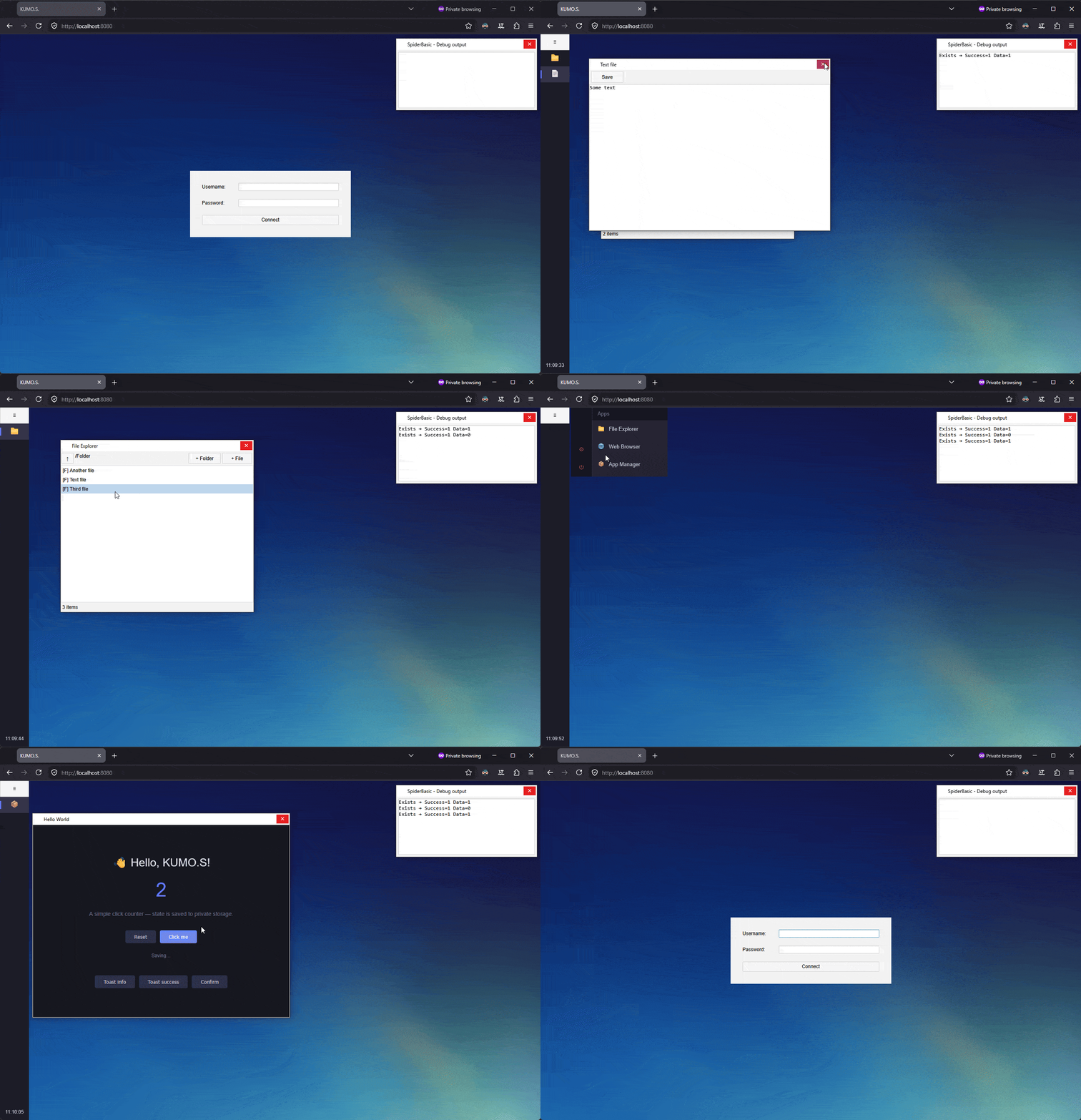
Here is KumOS, a cloud OS 100% written with PB and SB. It comes with all the features you could wish for: its very own file system, user management, a desktop compositor, application management, security layers... Basically the best of 2004 technology available today!
I originally planned to release it as an April Fool's joke, but I honestly underestimated the amount of work, even for such a simple scope, and it took me a whole extra month to complete.
So here we are: please enjoy my May Fool's joke !
!
1. TLDR, I just want to test it
Good: Download Server.zip, build the PureBasic project with debugger enabled, and it'll start a local web server. Visit http://localhost:8080/ in your browser, login using admin/admin.
There is a single demo application that you can install, available here: https://lastlife.net/ForumUpload/HelloWorld.zip
2. How does it work?
The gist of it is quite simple: we have a FCGI server written in PureBasic and a front-end written in SpiderBasic.
The server is a multithreaded FastCGI application sitting behind an HTTP server. It handles user authentication with salted SHA-256 passwords and session cookies, a virtual filesystem backed by SQLite metadata and raw file blobs on disk, and a third-party app store that downloads, validates and extracts app bundles from zip archives. Everything is routed through a single PATH_INFO-based router, no framework, just a Select/Case dispatch.
The API is a straightforward REST-ish JSON interface under /api/. Authentication lives at /api/auth/, the filesystem at /api/fs/, and the app store at /api/apps/. The filesystem exposes the usual suspects list, stat, read, write, mkdir, delete, move all scoped to the logged-in user. The app store adds install, uninstall, list, and a per-user bundle file serving route. Static files including the compiled SpiderBasic frontend are served directly by the HTTP server; only API calls pass through to the PureBasic FastCGI process.
The frontend communicates with the server exclusively through standard HTTP requests via SpiderBasic's HTTPRequest(). Third-party apps are a special case: they run inside sandboxed iframes (no allow-same-origin, so they are fully isolated even though they are served from the same host) and cannot make API calls directly. Instead, they talk to the shell through postMessage, and the shell (after checking the app's declared permissions) makes the API call on their behalf and posts the result back. This means a rogue app cannot touch your files or session unless you explicitly granted it permission at install time.
3. I want to write an app for it!
Sure. You are a weird one, but I always welcome my fellow nerds!
You'll need a manifest.json at the root of your zip that declares your app's identity and what it's allowed to do:
Available permissions are storage (your app's private file namespace, always granted), notify (toasts and confirm dialogs), fs.read and fs.write (access to the user's full filesystem; expect users to be suspicious of these).
Pure JS/HTML:
In your index.html, include the SDK and call KUMOS.ready() before anything else:
The SDK gives you KUMOS.storage.*, KUMOS.fs.*, KUMOS.notify.* and KUMOS.window.* as Promise-based APIs. Zip your index.html and manifest.json together and install from the App Manager.
In SpiderBasic:
You'll want to include this file: KUMOS.sbi.
The SB SDK wraps the same protocol in a callback-based API that matches SpiderBasic's native async style: KUMOS::Storage_Read(Path, @Callback()), KUMOS::Notify_Toast(Message, KUMOS::#Success) and so on. Call KUMOS::Init() first, then KUMOS::Ready(@OnReady()), and do all your setup from the OnReady callback. A full commented template project is available here.
4. Some notes:
You've heard of those browsers/JavaScript OS you see every once in a while? When a bored hobbyist is left unsupervised with their computer for a bit too long? Well...
Here is KumOS, a cloud OS 100% written with PB and SB. It comes with all the features you could wish for: its very own file system, user management, a desktop compositor, application management, security layers... Basically the best of 2004 technology available today!
I originally planned to release it as an April Fool's joke, but I honestly underestimated the amount of work, even for such a simple scope, and it took me a whole extra month to complete.
So here we are: please enjoy my May Fool's joke
!1. TLDR, I just want to test it
Good: Download Server.zip, build the PureBasic project with debugger enabled, and it'll start a local web server. Visit http://localhost:8080/ in your browser, login using admin/admin.
There is a single demo application that you can install, available here: https://lastlife.net/ForumUpload/HelloWorld.zip
2. How does it work?
The gist of it is quite simple: we have a FCGI server written in PureBasic and a front-end written in SpiderBasic.
The server is a multithreaded FastCGI application sitting behind an HTTP server. It handles user authentication with salted SHA-256 passwords and session cookies, a virtual filesystem backed by SQLite metadata and raw file blobs on disk, and a third-party app store that downloads, validates and extracts app bundles from zip archives. Everything is routed through a single PATH_INFO-based router, no framework, just a Select/Case dispatch.
The API is a straightforward REST-ish JSON interface under /api/. Authentication lives at /api/auth/, the filesystem at /api/fs/, and the app store at /api/apps/. The filesystem exposes the usual suspects list, stat, read, write, mkdir, delete, move all scoped to the logged-in user. The app store adds install, uninstall, list, and a per-user bundle file serving route. Static files including the compiled SpiderBasic frontend are served directly by the HTTP server; only API calls pass through to the PureBasic FastCGI process.
The frontend communicates with the server exclusively through standard HTTP requests via SpiderBasic's HTTPRequest(). Third-party apps are a special case: they run inside sandboxed iframes (no allow-same-origin, so they are fully isolated even though they are served from the same host) and cannot make API calls directly. Instead, they talk to the shell through postMessage, and the shell (after checking the app's declared permissions) makes the API call on their behalf and posts the result back. This means a rogue app cannot touch your files or session unless you explicitly granted it permission at install time.
3. I want to write an app for it!
Sure. You are a weird one, but I always welcome my fellow nerds!
You'll need a manifest.json at the root of your zip that declares your app's identity and what it's allowed to do:
Code: Select all
{
  "id":          "com.yourname.yourapp",
  "name":        "My App",
  "version":     "1.0.0",
  "icon":        "🚀",
  "entry":       "index.html",
  "permissions": ["storage", "notify"]
}Pure JS/HTML:
In your index.html, include the SDK and call KUMOS.ready() before anything else:
Code: Select all
<script src="/kumos.js"></script>
<script>
  KUMOS.ready().then(function() {
    KUMOS.window.setTitle('My App');
    KUMOS.notify.toast('Hello from My App!', 'success');
  });
</script>In SpiderBasic:
You'll want to include this file: KUMOS.sbi.
The SB SDK wraps the same protocol in a callback-based API that matches SpiderBasic's native async style: KUMOS::Storage_Read(Path, @Callback()), KUMOS::Notify_Toast(Message, KUMOS::#Success) and so on. Call KUMOS::Init() first, then KUMOS::Ready(@OnReady()), and do all your setup from the OnReady callback. A full commented template project is available here.
4. Some notes:
- It goes without saying that this is a joke project (despite the crazy efforts I put in). I won't fix anything, I won't add any feature, it's already very close to imploding as it is.
- I did my best to reduce JS as much as possible, and if you ignore the lower-level API, it's almost pure SB code through and through. While KUMOS has literally no use case in the real world, I believe it's actually a great showcase for SpiderBasic.
- Thank my Duolingo streak for its name: kumo (雲) means cloud in Japanese, while kumo (蜘蛛) means spider. The pun was too good to ignore.
